
Compare Hardware
Compare the details. Find your fit.
2 productsSide-by-side comparison |
|---|


AI insights
| Buyer advice | Preparing AI insights | |
|---|---|---|
| Overview | ||
|---|---|---|
| Price | $336.00 | $299.00 $449.00 |
| Availability | Not specified | In stock |
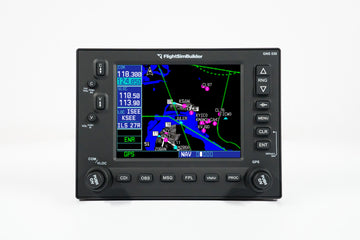
| CockpitSquare overview | The FlightSimBuilder GNS 530 is a standalone flight-simulator GPS avionics unit with a front panel, LCD controls, HDMI display connection, USB interface, and included power, HDMI, and USB cables. It supports Microsoft Flight Simulator 2020/2024 and generic X-Plane compatibility. | The RealSimGear GNS530 is a standalone hardware interface replicating the Garmin GNS 530 navigator for flight simulation. It provides tactile knobs and buttons, supports desktop or panel mounting, and connects to compatible simulators through USB and a display connection. |
| Aircraft | Not specified | Not specified |
| Aviation category | Universal / Generic | Universal / Generic |
| Compatibility & connections | ||
| Supported simulators | Microsoft Flight Simulator: MSFS 2020/2024 X-Plane: Generic X-Plane support; version not specified | X-Plane 11: Supported on Windows X-Plane 12: Supported on Windows MSFS 2020: Supported MSFS 2024: Supported |
| Connections | Display: HDMI USB: USB cable included; recognized as a joystick Power: Dedicated power cable included | USB: USB cable included HDMI / DisplayPort: One HDMI connection required; HDMI cable not included Other: Power supply adapter included |
| Software requirements | Drivers: No additional drivers required | RealSimGear plugin: Install the plugin and configure the simulator's pop-out GPS screen for the product |
| Physical requirements | Computer: PC or Mac required Display connection: HDMI connection required; DP-to-HDMI adapter may be needed for DisplayPort output | Display cable: User must provide an HDMI cable; compatible DisplayPort or DVI-to-HDMI connection may also be used |
| Hardware compatibility | Input recognition: The computer recognizes the unit as a joystick | Not specified |
| Simulator add-on compatibility | Not specified | Not specified |
| Dimensions & details | ||
| Product dimensions | Dimensions: 166 mm × 121 mm Panel mounting: Front panel extended for panel mounting | Not specified |
| Product weight | Not specified | Not specified |
| Additional factual details | Product version: GNS 530 MK2 Operating features: Power On/Off button; switch between GNS 530 and 430 modes by long-pressing ".V"; long-hold CLR functionality Display controls: LCD menu allows adjustment of brightness and contrast Included cables: Power cable with country-specific plug, HDMI cable, and USB cable Availability: Sold out at the time of page capture | Controls: Fully functional knobs and tactile silicone buttons Mounting: Can be used on a desktop or mounted in an existing panel; a separate desktop stand is referenced Assembly: Fully assembled; no assembly, 3D printing, or soldering required Included items: GNS530 navigator, USB cable, and power supply adapter Product purpose: Provides a physical interface for practicing Garmin 530 operation and flight-simulation navigation tasks Mac compatibility note: The product page states Windows-only compatibility for X-Plane; its FAQ separately discusses Intel-based Macs and Apple M-series limitations for RealSimGear products |