
Compare Hardware
Compare the details. Find your fit.
2 productsSide-by-side comparison |
|---|

AI insights
| Buyer advice | Preparing AI insights | |
|---|---|---|
| Overview | ||
|---|---|---|
| Price | $336.00 | $389.00 |
| Availability | Not specified | In stock |
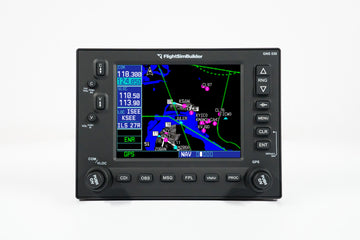
| CockpitSquare overview | The FlightSimBuilder GNS 530 is a standalone flight-simulator GPS avionics unit with a front panel, LCD controls, HDMI display connection, USB interface, and included power, HDMI, and USB cables. It supports Microsoft Flight Simulator 2020/2024 and generic X-Plane compatibility. | The RealSimGear GNS430 is a fully assembled hardware interface replicating the Garmin 430 navigator for flight-simulator practice. It provides functional knobs and tactile buttons, supports desktop or panel mounting, and is intended for navigation, radio-frequency, flight-plan, and instrument-procedure training. |
| Aircraft | Not specified | Not specified |
| Aviation category | Universal / Generic | General Aviation |
| Compatibility & connections | ||
| Supported simulators | Microsoft Flight Simulator: MSFS 2020/2024 X-Plane: Generic X-Plane support; version not specified | X-Plane: X-Plane 11 or 12 Microsoft Flight Simulator: Microsoft Flight Simulator 2020 and 2024 |
| Connections | Display: HDMI USB: USB cable included; recognized as a joystick Power: Dedicated power cable included | USB: USB cable HDMI / DisplayPort: HDMI connection required for the video display; DisplayPort or DVI-to-HDMI adapters may be used |
| Software requirements | Drivers: No additional drivers required | RealSimGear plugin: Install the RealSimGear plugin and configure the simulator's pop-out GPS screen |
| Physical requirements | Computer: PC or Mac required Display connection: HDMI connection required; DP-to-HDMI adapter may be needed for DisplayPort output | Display cable: HDMI cable is required but not included; an appropriate adapter/cable may be needed for DisplayPort or DVI Computer platform: X-Plane compatibility is stated for Windows only |
| Hardware compatibility | Input recognition: The computer recognizes the unit as a joystick | Mounting: Can be installed in an existing panel or used with the RealSimGear desktop stand |
| Simulator add-on compatibility | Not specified | Simulator pop-out GPS: Requires configuring the simulator's pop-out GPS screen |
| Dimensions & details | ||
| Product dimensions | Dimensions: 166 mm × 121 mm Panel mounting: Front panel extended for panel mounting | Not specified |
| Product weight | Not specified | Not specified |
| Additional factual details | Product version: GNS 530 MK2 Operating features: Power On/Off button; switch between GNS 530 and 430 modes by long-pressing ".V"; long-hold CLR functionality Display controls: LCD menu allows adjustment of brightness and contrast Included cables: Power cable with country-specific plug, HDMI cable, and USB cable Availability: Sold out at the time of page capture | Controls: Functional knobs and tactile silicone buttons Assembly: Fully assembled; no assembly, 3D printing, or soldering required Included items: GNS430 navigator, USB cable, and power supply adapter Power: Power supply adapter included Use case: Designed for Garmin 430 familiarization, IFR practice, flight-plan and approach-procedure training |