
Compare Hardware
Compare the details. Find your fit.
2 productsSide-by-side comparison |
|---|


AI insights
| Buyer advice | Preparing AI insights | |
|---|---|---|
| Overview | ||
|---|---|---|
| Price | $360.00 $660.00 | $479.99 $539.99 |
| Availability | In stock | Not specified |
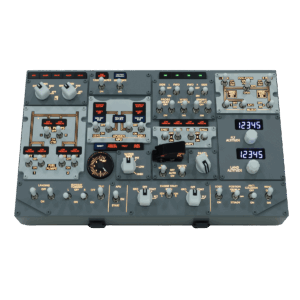
| CockpitSquare overview | A compact Airbus-style overhead panel for desktop flight-simulator setups. The product is intended to provide selected overhead-panel functions in a reduced-size format for users with limited space. | The PU OVHD B737 is a Boeing 737 overhead panel for flight simulation. It operates with PU CONNECT and is documented for Microsoft Flight Simulator and X-Plane workflows, with dedicated compatibility information for selected aircraft add-ons. |
| Aircraft | A320 | 737 |
| Aviation category | Airliners | Airliners |
| Compatibility & connections | ||
| Supported simulators | Microsoft Flight Simulator: MSFS 2020 and MSFS 2024 | Microsoft Flight Simulator: MSFS X-Plane: X-Plane |
| Connections | Not specified | USB: USB connection |
| Software requirements | JS-Connect for MSFS: Required or applicable interface software; exact dependency is not explicitly stated Firmware: ST-Flasher firmware version 1.1 is listed for Airbus OVH panel size:M | PU CONNECT: Required control software |
| Physical requirements | Production lead time: 10–15 days | Windows PC: Windows is referenced for device management and display configuration |
| Hardware compatibility | Not specified | Not specified |
| Simulator add-on compatibility | Fenix: Supported profile or documented compatibility FlyByWire: Supported profile or documented compatibility | Zibo: Compatible with Zibo for X-Plane LEVELU: Compatible with LEVELU for X-Plane |
| Dimensions & details | ||
| Product dimensions | Dimensions: 40 × 29 × 9 cm | Not specified |
| Product weight | Weight: 2.5 kg | Weight: 2.1 kg |
| Additional factual details | Design format: Airbus-style desktop-series overhead panel Space-saving design: Reduced overhead-panel format intended for limited-space setups Price shown: USD 360 sale price; USD 660 listed original price | Product type: B737 overhead panel MSFS compatibility versions: MSFS 2020 and MSFS 2024 are referenced in troubleshooting documentation X-Plane screen pop-out dependency: WEBFMC PRO is required for screen pop-out functionality on X-Plane Optional mapping software: Can be used with SPAD or other mapping software when the No Input option is enabled Customer-reported behavior: A verified customer review reports that the starter switch springs back and that the panel supports a cold-and-dark startup procedure |